Subscriptions
Create, manage, and cancel subscriptions
Data Model
The fragment keeps a local copy of the Stripe state your application reads: a customer table that
links each Stripe customer to an entity in your application through its referenceId, and a
subscription table with the subscriptions of those customers.
In Stripe's model:
- A Subscription connects a Customer (identified by your
referenceId) to a Price - A Product can have multiple Prices (e.g., monthly vs annual)
We assume that 1 reference id is mapped to 1 Stripe Customer, which can have N subscriptions. Note
that this is required even if you only want a single subscription per customer because cancelling a
subscription and renewing causes multiple subscription to be created by Stripe. In our API's we
often make the assumption of a single 'active' subscription, but multiple active subscriptions are
supported by providing the specific subscription id for a given action like upgrade or cancel.
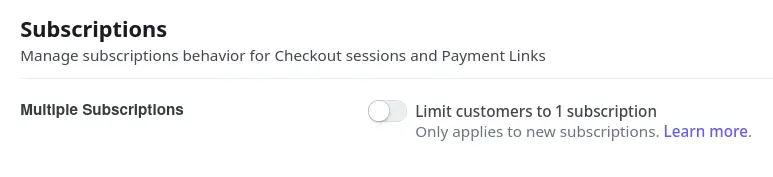
You can also configure Stripe to allow only a single (active) subscription per customer on the Checkout and Payment Links settings page:
Stripe also has a concept of "plans" but this API is superseded by the more flexible Prices API. This fragment uses the latter.
Mutations
Stripe is the source of truth for subscription state. Never modify subscription data in the database
tables. All subscription changes (create, update, cancel) should be performed through either this
fragments /subscription/upgrade or /subscription/cancel routes or directly through the Stripe
API. The tables are updated automatically via webhooks or on demand through
the syncSubscriptions service.
Security
To prevent exposing sensitive information make sure to only expose Stripe Price IDs to end-users, Stripe Customer IDs, Product IDs, and Subscription IDs should remain private.
Payment Collection
Collecting payments from users happens through a redirect to a Stripe Checkout page. Updating or cancelling a subscription happens through a redirect to a Stripe Customer Portal.
Database Schema
The fragment's tables are keyed by Stripe IDs:
customer: the Stripe customer ID and thereferenceIdof the entity it belongs to. Each entity has at most one customer.subscription: the Stripe subscription ID, its customer, thereferenceIdof that customer's entity, its price and quantity, status, period and cancellation dates.
A subscription belongs to the entity its customer is linked to. Before a customer is linked, the
referenceId in the Stripe customer's metadata names the entity, and a subscription keeps its
entity after its customer is deleted.
This allows you to query subscription data without making API calls to Stripe and ensures your application remains responsive even if Stripe is temporarily unavailable.
For setting up Fragno DB schemas, see the Fragno DB Quickstart.
Creating Subscriptions
To create a new subscription, use the upgradeSubscription mutator. This mutator handles both
creating new subscriptions and upgrading existing ones.
import { stripeClient } from "@/lib/stripe-client";

export function PricingCard({ priceId, planName }: { priceId: string; planName: string }) {
  const { mutate, loading, error } = stripeClient.upgradeSubscription();

  const handleSubscribe = async () => {
    const { url } = await mutate({
      body: {
        priceId: priceId, // Stripe price ID (e.g., "price_1234567890")
        successUrl: `${window.location.origin}/success`,
        cancelUrl: window.location.href,
      },
    });

    window.location.href = url; // Redirect to Stripe Checkout
  };

  return (
    <div className="pricing-card">
      <h3>{planName}</h3>
      <button onClick={handleSubscribe} disabled={loading}>
        {loading ? "Loading..." : "Subscribe"}
      </button>
    </div>
  );
}
Showing a Success Page
The Stripe Checkout portal will redirect the user back to successUrl after a successful payment,
at this point the webhook event that registers this payment may not (yet) have arrived. Therefore
you can create a dedicated success page which fetches the latest subscription status from Stripe
using the syncSubscriptions service to ensure the end-user sees the right result. See
Manual Synchronization for details.
Configuration
resolveEntityFromRequest (required)
Called on the routes that act for an entity (/subscription/upgrade, /subscription/cancel and
/portal) to identify which entity (user or organization) is making the request. Extract
authentication information from the request context (session cookies, JWT tokens in headers, etc.)
and return:
referenceId: your application's identifier for the entitycustomerEmail: the email set on the Stripe customer the fragment creates for this entitycustomerMetadata: metadata set on that Stripe customer
Return null when the request is not authenticated; the routes then respond with
401 UNAUTHENTICATED.
On an entity's first upgrade the fragment looks for a Stripe customer whose referenceId metadata
matches, which is how customers created by earlier integrations are picked up. Otherwise it creates
one. Either way it records the link in its customer table.
Callbacks (optional)
These run as durable hooks: after the change committed, at least once, and
retried when they throw. The second argument is the hook context, whose idempotencyKey identifies
the change.
onCustomerLinked({ customerId, referenceId }): a Stripe customer was linked to an entity, e.g. to keep a copy of the customer ID in your own tablesonSubscriptionChanged({ subscription }): a subscription changed;subscriptionis read when the callback runs, so it is the current stateonStripeEvent({ event }): any verified Stripe event, see Webhooks
import { createStripeFragment } from "@fragno-dev/stripe";
import { updateUser } from "@/db/user-repo";
import { getSession } from "@/lib/auth";

export const stripeFragment = createStripeFragment(
  {
    // ... other config

    resolveEntityFromRequest: async (context) => {
      // Extract authentication from your session/auth system
      const session = await getSession(context.headers);
      if (!session) {
        return null;
      }

      return {
        referenceId: session.user.id,
        customerEmail: session.user.email,
        customerMetadata: {
          // Additional metadata you want to attach
        },
      };
    },

    onCustomerLinked: async ({ customerId, referenceId }) => {
      await updateUser(referenceId, { stripeCustomerId: customerId });
    },
  },
  { databaseAdapter },
);
Importing Existing Customers
If your application already stores Stripe customer IDs, link them with the linkCustomer service.
Subscriptions of those customers that the fragment already stored are assigned to the entity in the
same transaction; the fragment then syncs the ones it has not seen yet.
const result = await stripeFragment.callServices(() =>
  stripeFragment.services.linkCustomer({ customerId: user.stripeCustomerId, referenceId: user.id }),
);
if (!result.ok) {
  // REFERENCE_ALREADY_LINKED or CUSTOMER_ALREADY_LINKED
  console.warn(result.code);
}
Retrieving Subscriptions
The fragment exposes service functions that can be used server-side to query its tables:
import { stripeFragment } from "@/lib/stripe";

// All subscriptions of an entity (e.g. a user ID), including ended ones
const subscriptions = await stripeFragment.callServices(() =>
  stripeFragment.services.getSubscriptionsByReferenceId(user.id),
);

// The Stripe customer linked to an entity, or null
const customer = await stripeFragment.callServices(() =>
  stripeFragment.services.getCustomerByReferenceId(user.id),
);
Handling Multiple Subscriptions
When users have multiple subscriptions, you need to specify which subscription to upgrade or cancel using the subscription ID, which is the Stripe subscription ID.
const { mutate } = stripeClient.upgradeSubscription();

await mutate({
  body: {
    priceId: "price_new_plan",
    subscriptionId: subscriptionId,
    successUrl: `${window.location.origin}/success`,
    cancelUrl: window.location.href,
  },
});
Canceling Subscriptions
Users can cancel their subscriptions using the cancelSubscription mutator. Cancellations are
handled through Stripe's Billing Portal, where users confirm their cancellation.
import { stripeClient } from "@/lib/stripe-client";

export function CancelSubscriptionButton() {
  const { mutate, loading, error } = stripeClient.cancelSubscription();

  const handleCancel = async () => {
    const { url } = await mutate({
      body: {
        returnUrl: `${window.location.origin}/account`,
      },
    });

    window.location.href = url; // Redirect to Stripe Billing Portal
  };

  return (
    <button onClick={handleCancel} disabled={loading}>
      {loading ? "Processing..." : "Cancel Subscription"}
    </button>
  );
}
Changing Subscription Plans
To change the user from one plan to another, use the same upgradeSubscription mutator with a
different price ID. If the user already has an active subscription, the fragment will create a
Stripe Billing Portal confirming the change. If that subscription is scheduled to cancel, upgrading
resumes it instead and returns returnUrl (or successUrl). The upgrade and cancel routes look up
the customer's subscriptions in Stripe rather than in the local tables, so they act on the current
state even before webhooks arrive.
const { mutate } = stripeClient.upgradeSubscription();

await mutate({
  body: {
    priceId: "price_new_plan", // The new price ID
    successUrl: `${window.location.origin}/success`,
    cancelUrl: window.location.href,
  },
});
Managing Billing Details
The Stripe fragment provides a useBillingPortal mutator that generates a redirect URL for users to
Stripe's hosted billing portal. This portal can be used to:
- Update payment methods
- View invoices and payment history
- Update billing information
const { mutate, error, loading } = stripeClient.useBillingPortal();

const response = await mutate({
  body: {
    returnUrl: `${window.location.origin}/account`,
  },
});

if (response) {
  window.location.href = response.url; // Redirect to Stripe Billing Portal
}
Manual Synchronization
The subscription table is automatically kept in sync with Stripe through webhook events. However, there are cases where you cannot depend on webhook events because you need a guarantee that you have the most recent data.
For example a "checkout success" page, directly after a user completes payment through Stripe Checkout. They should see their subscription status reflected in your UI immediately. Since webhooks could arrive a few seconds later, it would be better to get the latest info from Stripe directly on the checkout success page.
Using syncSubscriptions
The syncSubscriptions service fetches the subscriptions of an entity's Stripe customer from Stripe
and stores them, in one transaction. Webhooks that arrive later find nothing left to change.
import { stripeFragment } from "@/lib/stripe";
import { getSession } from "@/lib/auth";

/* ... */

const session = await getSession();

// Sync latest subscription data to the database
await stripeFragment.callServices(() => stripeFragment.services.syncSubscriptions(session.user.id));

// Now you can assume the db state is recent
const subscriptions = await stripeFragment.callServices(() =>
  stripeFragment.services.getSubscriptionsByReferenceId(session.user.id),
);